

Lose It GLP-1 tracking is finally a real thing: in 2026 the calorie-counting app added a “GLP-1 Support” mode that logs doses, rotates injection sites, and charts your estimated medication level. That changes the old “Pep vs Lose It!” debate. Lose It! used to have zero medication tools; now it has some, but only behind Premium. So which app actually fits a GLP-1 user’s week better? Here’s an honest, updated breakdown.
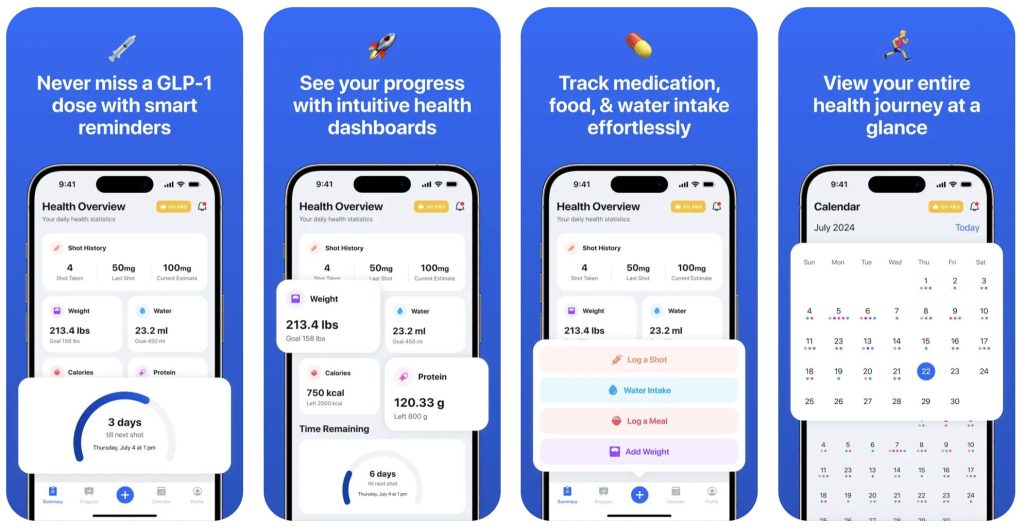
The short answer: Pep. Lose It! now lets Premium members log a dose and see a levels chart. Pep gives you the dose log, reminders, the medication-level indicator, site rotation, side-effect patterns, progress photos, and GLP-1-focused nutrition with barcode scanning, all free, on iPhone and Android in 10 languages.
You can be logging your first dose in under two minutes, free, with the Pep GLP-1 tracker.
Pep vs Lose It: feature comparison
| Feature | Pep | Lose It! |
|---|---|---|
| Log weekly shots and daily pills | ✓ Free | Premium |
| Dose reminders | ✓ Free | Not listed |
| Next-dose home-screen widget | — | — |
| Medication-level indicator | ✓ Free | Premium |
| Titration / dose-escalation schedule | ✓ | — |
| Injection-site rotation | ✓ | Location note |
| Side-effect log tied to dose day | ✓ | — |
| Progress photos | ✓ | — |
| Body measurements | ✓ | ✓ |
| Barcode scanning & food search | ✓ Free | ✓ |
| AI photo food scanning | Pro | — |
| Protein, fiber & water goals | ✓ Free | Premium (custom goals) |
| Apple Health sync | ✓ | ✓ |
| Free web calculators | ✓ | — |
| Price for GLP-1 tracking | Free | Premium (about $40–$80/yr) |
✓ = included. Premium = requires a paid Lose It! plan per its GLP-1 Logging support guide. — = not described in that guide or the app listing as of September 2026.
What Lose It GLP-1 Support actually does
According to Lose It!’s own support guide (updated September 2026), the feature is a toggle in your Profile under Program. Once it’s on, you can:
- Log a dose for Zepbound, Mounjaro, Wegovy, Ozempic, Saxenda, Victoza, Trulicity, or “semaglutide pills,” including the injection location.
- View an estimated GLP-1 levels chart.
Several catches stand out. GLP-1 tracking requires a Premium membership; the free tier still can’t log a dose. The guide is careful to note the chart “only models recorded entries,” and there’s no mention of dose reminders, which is the feature most people say keeps them consistent. And there is no titration schedule, no side-effect log tied to your doses, and no progress-photo timeline, all of which Pep includes free.
Lose It GLP-1 vs Pep: feature by feature
1. Dose logging and reminders
- Pep: One-tap logging for weekly shots and daily pills, a reminder on your chosen day and time, and injection-site history. All of it is free.
- Lose It!: Dose logging with injection location, but Premium-only, and the current guide doesn’t describe shot reminders.
Edge: Pep, mainly because reminders are free and built for the dose day itself.
2. Medication-level indicator
- Pep: Shows the active window between doses so you know whether you’re near a peak or a trough.
- Lose It!: An estimated-levels graph, but only on Premium, and only as accurate as the doses you remember to enter without a reminder.
Edge: Pep. Both views are estimates from published half-lives, but Pep’s is free, sits next to a reminder that keeps the entries accurate, and pairs with a free GLP-1 medication level calculator if you want the full curve, no subscription needed.
3. Nutrition tracking
- Pep: A food database and barcode scanner, free, plus an AI photo scanner on Pro, with goals for the metrics that actually matter on a GLP-1: protein, fiber, calories, and water. Built for a suppressed appetite, where the goal is hitting protein, not counting every calorie.
- Lose It!: Calorie budgeting built for traditional dieting. The app is organized around a calorie budget, which is the one number GLP-1 users tend to need least, with custom goals behind Premium.
Edge: Pep for GLP-1 users. Lose It! only wins if you want a deep calorie diary for its own sake. Not sure how much protein you need? Our free GLP-1 protein calculator gives you a daily target and a per-meal breakdown.
4. Side effects and progress photos
- Pep: Log nausea, fatigue, constipation, or anything else against the day of the dose, so you can spot patterns like “worse for two days after each step-up.” Weight, measurements, and a progress-photo timeline are included free.
- Lose It!: Weight tracking and graphs are solid. Side-effect logging isn’t a dedicated feature, and there’s no photo timeline.
Edge: Pep. Side-effect patterns are half the reason to track a GLP-1 at all; see our guide to managing GLP-1 side effects.
5. Price
- Pep: Free to download, and dose, weight, side-effect, and reminder tracking are free. An optional Pro plan (about $40 a year) adds extras, but you never need it to track your medication.
- Lose It!: Free for basic calorie counting. GLP-1 Support requires Premium, which has been listed at roughly $40 to $80 a year in 2026 depending on when you subscribed and current promos. Check the app for today’s price.
Edge: Pep, if medication tracking is the reason you’re downloading an app.
Which app should a GLP-1 user pick?
Think about what you’ll open on shot day (or pill time) and what you’ll open at dinner.
- Choose Pep if you want the dose reminder, site rotation, side-effect log, and progress photos in one free place, with nutrition that’s simple enough to keep up with on a small appetite. You can track it all free with Pep on iPhone or Android.
- Choose Lose It! Premium only if you’re already a devoted Lose It! calorie logger and are willing to pay for a dose log without reminders. Even then, many people keep Pep alongside it for the free reminders, side-effect log, and progress photos.
Whichever you choose, log every dose promptly. Both apps’ level charts are only as accurate as the entries behind them, and if you do slip, our missed GLP-1 dose guide explains what the labels say to do.
How the 2026 update changes the comparison
When we first compared these apps, Lose It! had no medication features at all, so the verdict was easy. The Lose It GLP-1 launch closes part of that gap, especially the levels chart, and it’s a sign that mainstream nutrition apps now take GLP-1 users seriously (MyFitnessPal made a similar move; see our MyFitnessPal GLP-1 comparison). What hasn’t changed: a dedicated tracker still treats the dose, not the calorie, as the center of your day. For a broader look at the field, our roundup of the best GLP-1 tracker apps covers Shotsy, Glapp, MeAgain, and more.
FAQ: Lose It GLP-1 tracking
Is Lose It GLP-1 tracking free?
No. Lose It!’s support documentation states that GLP-1 tracking requires a Premium membership. Free accounts can still count calories but can’t log doses or see the GLP-1 Levels chart. Pep’s dose logging and reminders are free.
Does Lose It! send GLP-1 dose reminders?
Its GLP-1 Logging guide describes dose entry, injection location, and the levels chart, but doesn’t mention scheduled shot or pill reminders. If a reminder is what keeps you on track, confirm it in the app before paying for Premium, or use Pep’s free reminders alongside it.
Can I use Lose It! and Pep together?
Yes. Many people log meals in Lose It! and keep their doses, side effects, and progress photos in Pep. Pep also syncs weight with Apple Health on iPhone, which makes juggling two apps easier.
Download Pep free — track your shots, pills & progress in one app.


This article is for educational purposes only and is not medical advice. Always follow your healthcare provider’s guidance on dosing and treatment.